PhotoGrid: Video Collage Maker
- 4.7
- Rating
- 10.00M
- Installs
- Free
- Price

 Analysis by App-foxy
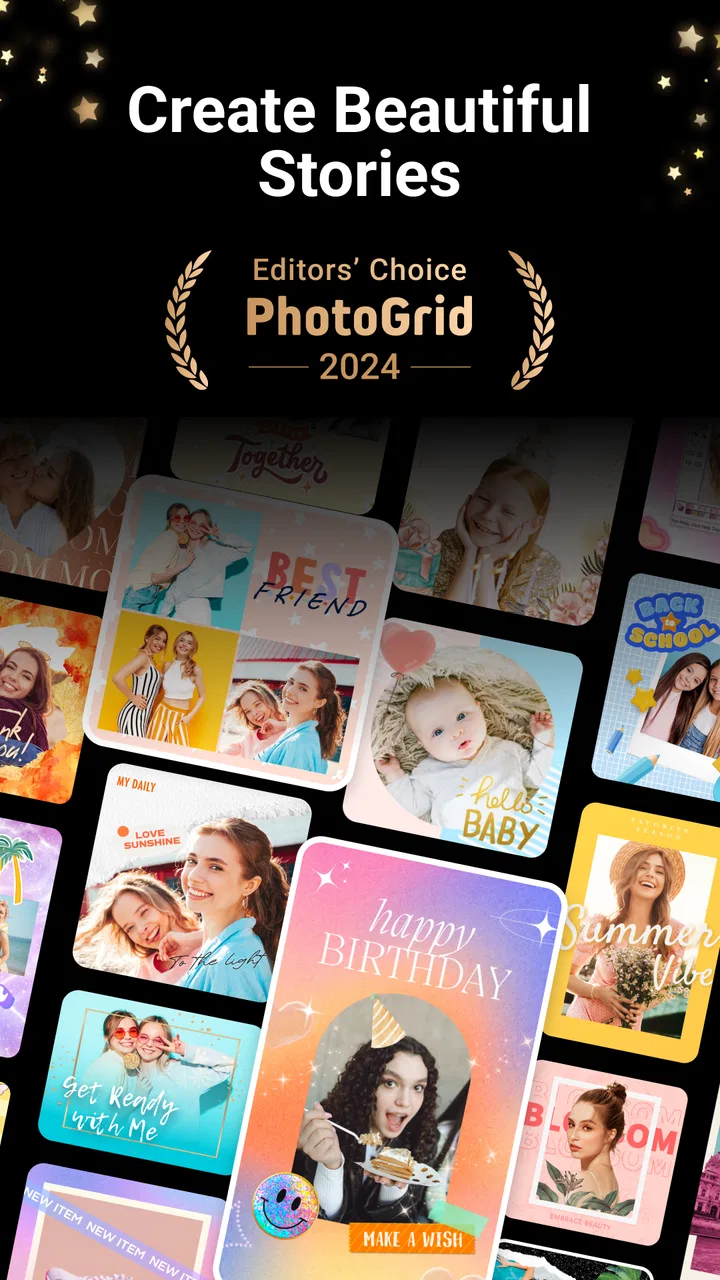
I use collage editors when I need something more polished than a single image but do not want to open a full desktop design tool. PhotoGrid: Video Collage Maker fits that middle ground well. It is a photography app from PhotoGrid Corporation that brings photos and short videos into one editing workspace, with collage creation as its main appeal and an AI remover tool aimed at cleaning up unwanted parts of an image.
After spending time with it, my impression is that it is best understood as a quick visual assembly tool rather than a replacement for a complete photo editor. It helps turn a group of pictures into a shareable layout, gives casual creators plenty of ways to make a post feel finished, and keeps the process approachable. At the same time, its broader feature set can feel busy, and the free experience needs to be judged separately from the paid extras.
How PhotoGrid fits into everyday photo editing
The app belongs to the photography category, but its strongest identity is the combination of photo collages, video collages, and fast visual cleanup. That combination matters because many people do not want to edit every picture individually. They want to combine several moments from a day out, arrange product images for a small shop, or make a simple birthday post without learning a complicated timeline editor.
You May Also Like

 Google Keep - Notes and lists
Google Keep’s Quiet Growth Shows the Appeal of Simpler Notes
As mobile work gets busier, Google Keep keeps winning a simple contest: capture a thought quickly, find it later, and get on with the day.

 Blood Strike: 2.5 Anniversary
Blood Strike’s Loadouts Turn Every Drop Into a Tactical Gamble
A close look at Blood Strike’s custom loadouts: how fast access to signature weapons reshapes its battle royale rhythm, rewards preparation, and narrows the gap between fights.

 Pandora - Music & Podcasts
Pandora’s Music Is Easy to Start, but Harder to Recover
Pandora’s strength is its low-effort path from a seed to a station. Its weak spot is how much confidence it asks you to place in connection, setup, and quiet recovery.

 8 Ball Pool
 Is Built on Rivalries, Rematches, and Routine
A close look at the rivalries, rematches, shared routines, and unanswered safety questions that turn a quick pool match into a persistent mobile community.

 Samsung Music
’s Quiet Strength Is Playing What You Already Own
Its reach comes less from spectacle than from dependable access to a personal library. That simplicity is both the app’s strongest retention engine and its ceiling.

 AccuWeather: Weather Radar
AccuWeather Review: A Quick, Clear Forecast for Everyday Decisions
For everyday plans, the best forecast is the one you can understand quickly. AccuWeather makes rain timing, radar, and local conditions easy to act on, with a few trade-offs.
More From Our News Desk



The first useful distinction is between making an image look better and making several images tell a story together. A conventional camera editor is usually better for exposure, color, cropping, or detailed retouching on one photograph. PhotoGrid is more useful when the final result needs a layout: several images on one canvas, a mixture of still images and clips, or a compact visual summary that can be shared as one piece.
That makes it particularly convenient for people who collect pictures in their phone gallery and only decide later how to present them. I can start with a loose group of images instead of planning a design in advance. The app’s value is in reducing the distance between “these are the pictures I want to use” and “this is a finished composition I can send or publish.”
What the free download means in practice
The app is free to download, and that is important because the basic decision is not whether to pay before trying it. You can install it and judge whether its collage workflow suits you first. The store lists in-app purchases ranging from $0.99 to $99.99 per item, so the free entry point and the possible paid spending are very different parts of the experience.
I would not treat the word “free” as a promise that every editing option is included. A sensible approach is to begin with a real project rather than tapping through every decorative tool. Try assembling the type of collage you actually need, check how comfortable the editing steps feel, and only then decide whether any locked or optional item is worth buying. That prevents a small one-off project from turning into an unnecessary purchase.
The pricing range also means value depends heavily on your habits. Someone who makes an occasional travel collage may find the free access sufficient and never need to spend anything. Someone who creates visual content regularly may see value in paid additions, but only if those additions save enough time or provide a style they would otherwise have to build elsewhere. The available purchase facts show the range, not a universal subscription promise, so I would evaluate each purchase on its own rather than assuming that paying automatically unlocks a better overall workflow.
Where the app delivers real value
The most convincing benefit is speed. Instead of exporting each picture from one editor and then arranging everything in another design app, I can keep the project centered on the collage itself. That is useful when the layout is the main creative decision. Choosing which image deserves the largest space, deciding whether a video should sit beside still photos, and balancing busy and quiet images often matters more than applying another filter.
The AI remover tool is another practical reason to try it. Removing an unwanted visual element can rescue a picture that would otherwise be left out of a collage. A stray object, a distracting background detail, or a person appearing at the edge can pull attention away from the subject. When the removal works cleanly, it is more efficient than searching for a separate retouching app just for one correction.
My advice is to use the remover before finalizing the layout. If I place an image first and clean it afterward, the composition may already be balanced around an object that no longer exists. Removing distractions early gives me a better sense of spacing and helps avoid awkward empty areas. This is a small workflow change, but it makes the tool more useful than treating it as a last-minute rescue button.
There is also value in combining photos and video in the same creative task. A normal photo grid can make a set of still images feel organized, but it cannot express movement. A short clip can provide the missing sense of atmosphere in a collection of otherwise static memories. For a weekend event, for example, I might use stills for faces and details, then include a brief motion clip for the moment that is difficult to capture in one frame.
A realistic scenario: preparing a quick event post
Imagine returning from a friend’s birthday with several portraits, a group shot, a picture of the cake, and a short video of everyone singing. I would not want to edit every file separately. Instead, I would select the strongest images, remove a distracting background detail from the group shot if needed, and build a collage that gives the group picture more space than the supporting images.
The important choice here is restraint. A collage becomes harder to read when every frame has equal visual weight or when decoration competes with the people. I would use the video as the emotional center only if its movement adds something that the photos cannot. Otherwise, a still layout may communicate the event more clearly. PhotoGrid makes this kind of decision easier because the project is organized around the final composition rather than around a sequence of isolated edits.
For a small seller, the same workflow can be used differently. A product photo can occupy the largest panel, while detail images show texture, packaging, or available variations. The remover can help clean a distracting background element, but I would still inspect the result closely before using the image commercially. A fast automated correction is convenient; it is not a substitute for checking edges, repeated patterns, or fine details that may look unnatural after removal.
How it compares with the usual alternatives
Compared with a basic gallery editor, PhotoGrid is more suitable when several assets need to become one finished image or video composition. A gallery editor usually wins for quick cropping and simple adjustments, but it may not be designed around flexible collage construction. If your goal is only to brighten one portrait, opening a collage-focused app may add unnecessary steps.
Compared with a full design platform, PhotoGrid feels more immediate for personal photo projects. A design platform can offer broader control over typography, branding, page structure, and reusable layouts. That is the better direction for a business that needs consistent templates across many campaigns. PhotoGrid is more appealing when the source material is already in your phone and the result should be assembled quickly around those images.
Compared with a dedicated video editor, it is also a compromise. A video editor is normally the stronger choice for precise timing, layered sound, detailed transitions, or a carefully planned sequence. PhotoGrid makes more sense when video is one ingredient inside a collage-style presentation, not when the entire project depends on fine timeline control.
This distinction helps avoid disappointment. The app is not valuable because it replaces every other creative tool. It is valuable when its specific combination of layouts, mixed media, and quick cleanup removes the need to move between several simpler apps.
The tradeoffs I noticed
The same breadth that makes the app convenient can make it feel crowded. A person who wants one obvious button for “make a clean grid” may need to look through several creative directions before settling into a workflow. I recommend starting with the simplest layout that matches the project, then adding decoration only when it improves the message. Otherwise, the number of choices can become the task.
AI removal also has a natural tradeoff between speed and precision. It is most useful when the unwanted element is visually separable from the subject and background. It is less dependable for complicated edges, hair, patterned surfaces, or objects that overlap the main subject. I would use it confidently for a quick social post, but I would inspect every important image at a closer view before relying on it for a polished portfolio or product presentation.
Mixed photo-and-video projects require their own discipline. Still images and clips do not always have the same visual rhythm, and a collage can feel unbalanced if one moving panel dominates the rest. I find it better to choose the video because it adds information or emotion, not simply because the app allows it. A short clip should support the story of the collage rather than distract from the photographs.
There is also a practical cost consideration. Free access makes experimentation easy, but the presence of individual purchases from $0.99 to $99.99 means I would pay attention before confirming anything. For a casual user, the right value may be using the free tools and stopping there. For a frequent creator, a paid item might be reasonable if it solves a repeated problem, but I would not buy based only on the promise of having more options.
Who will get the most from it
I think the best audience is people who regularly share groups of images and want them to look intentional without learning advanced design software. Travelers, families, students, casual creators, and small sellers can all benefit from a tool that turns scattered gallery content into a single visual piece. It is especially useful when speed matters more than pixel-level control.
The app is also a good fit for someone who often says, “I have too many pictures to post separately.” A collage can reduce that problem while giving the viewer a clearer summary. The AI remover adds value when your best photo has one distracting detail, and the video support helps when a memory is better represented by movement than by a still frame.
I would be more cautious if you want professional-grade retouching, advanced color work, or a detailed video timeline. In those cases, a specialized editor is likely to be a better primary tool. I would also skip it if you strongly prefer minimal interfaces and never create collages; a conventional photo editor may feel faster for your needs.
Device and audience details worth knowing
The current version is 9.25, and the minimum operating system is Android 9. That makes checking your device compatibility straightforward before installation. The app is rated for Everyone, so its intended audience is broad rather than restricted to adults, although individual creative choices and any purchase decisions still deserve normal parental awareness on shared devices.
Its reach is reflected in a 4.7 average from around 93 thousand ratings, with over 10 million installs. Those figures suggest that the app has found a large audience, but they should not replace testing the workflow yourself. A popular collage editor can still be the wrong fit if your projects require precise typography, advanced masking, or detailed video control.
PhotoGrid Corporation is the developer behind the app. I would keep that name in mind when looking for the correct product, since the short store description is simply “PhotoGrid” and the full app name is more descriptive of what it does. The free price makes trying it low-risk in terms of upfront cost, while the in-app purchase range makes it sensible to review each optional purchase carefully.
My buy-or-skip verdict
I would recommend trying PhotoGrid if your main need is quick, attractive photo assembly with occasional video mixed in. The app delivers its strongest value when it saves you from juggling a gallery editor, a collage maker, and a separate cleanup tool for one small project. The AI remover is particularly useful as part of a broader workflow: clean the important images first, then arrange them around a clear visual hierarchy.
I would skip paid extras unless they solve a problem you encounter repeatedly. The free starting point is enough to determine whether the editing style feels natural, and the listed purchase range is wide enough that an impulsive upgrade may not make sense for an occasional user. For regular creators, paid value can be justified when it reduces repeated work, but the decision should come from actual use rather than from collecting every available option.
My final view is positive but specific: this is a practical collage maker for people who want finished results quickly, not an all-purpose replacement for specialist editing software. It earns its place on my phone when I need to combine memories, product images, and short clips into one coherent piece. If that is your everyday use case, the free download is worth exploring. If your priority is detailed retouching or professional video production, your money and time will be better spent with a more focused alternative.
FAQs for PhotoGrid: Video Collage Maker
01What features does PhotoGrid: Video Collage Maker offer?
PhotoGrid: Video Collage Maker provides a variety of features including photo and video collage creation, a range of filters and effects, text and sticker options, and background customization. It also supports editing tools such as cropping, resizing, and rotating. Additionally, it offers templates for quick and easy collage creation.
02Is PhotoGrid free to use, or are there in-app purchases?
PhotoGrid is free to download and use, but it offers in-app purchases for premium features. While the basic features are accessible at no cost, subscribing to the premium version unlocks additional tools, ad-free usage, and access to exclusive templates and effects, enhancing the overall experience.
03Can I share my collages directly to social media from PhotoGrid?
Yes, PhotoGrid allows you to share your creations directly to various social media platforms such as Instagram, Facebook, and Twitter. The app is designed to make the sharing process seamless, ensuring your collages are optimized for each platform's requirements, saving you time and effort.
04What file formats are supported by PhotoGrid: Video Collage Maker?
PhotoGrid supports a range of file formats including JPEG, PNG, and MP4 for video. This flexibility ensures you can work with most common image and video files, making it convenient to import and export your projects without needing additional conversion tools.
05Is PhotoGrid suitable for beginners?
PhotoGrid is highly user-friendly, making it suitable for beginners. Its intuitive interface and easy-to-follow tutorials help new users navigate through its features with ease. Whether you’re creating a simple photo collage or a more complex video montage, PhotoGrid provides the tools and guidance needed.
Pros
- Easy-to-use interface for quick edits.
- Wide range of filters and effects.
- Supports multiple photo formats.
- Comprehensive collage templates.
- Regular updates with new features.
Cons
- Contains in-app advertisements.
- Some features require a subscription.
- Can be resource-intensive on older devices.
- Limited video editing capabilities.
- Occasional app crashes reported.

PhotoGrid: Video Collage Maker
Gallery